


Find meters
Scan primary addresses 0–250 or secondary ID masks. Select 300–9600 baud, retries and timeouts; stop a scan while keeping partial results.

RELETEC / WIRED M-BUS

Discover wired M-Bus meters through a USB master. Inspect readings, units and raw telegrams, then configure supported values using the meter documentation.
Free. No subscription.
Version 1.1.0 · Windows x64 · 8 interface languages
○ Unsigned test release ↗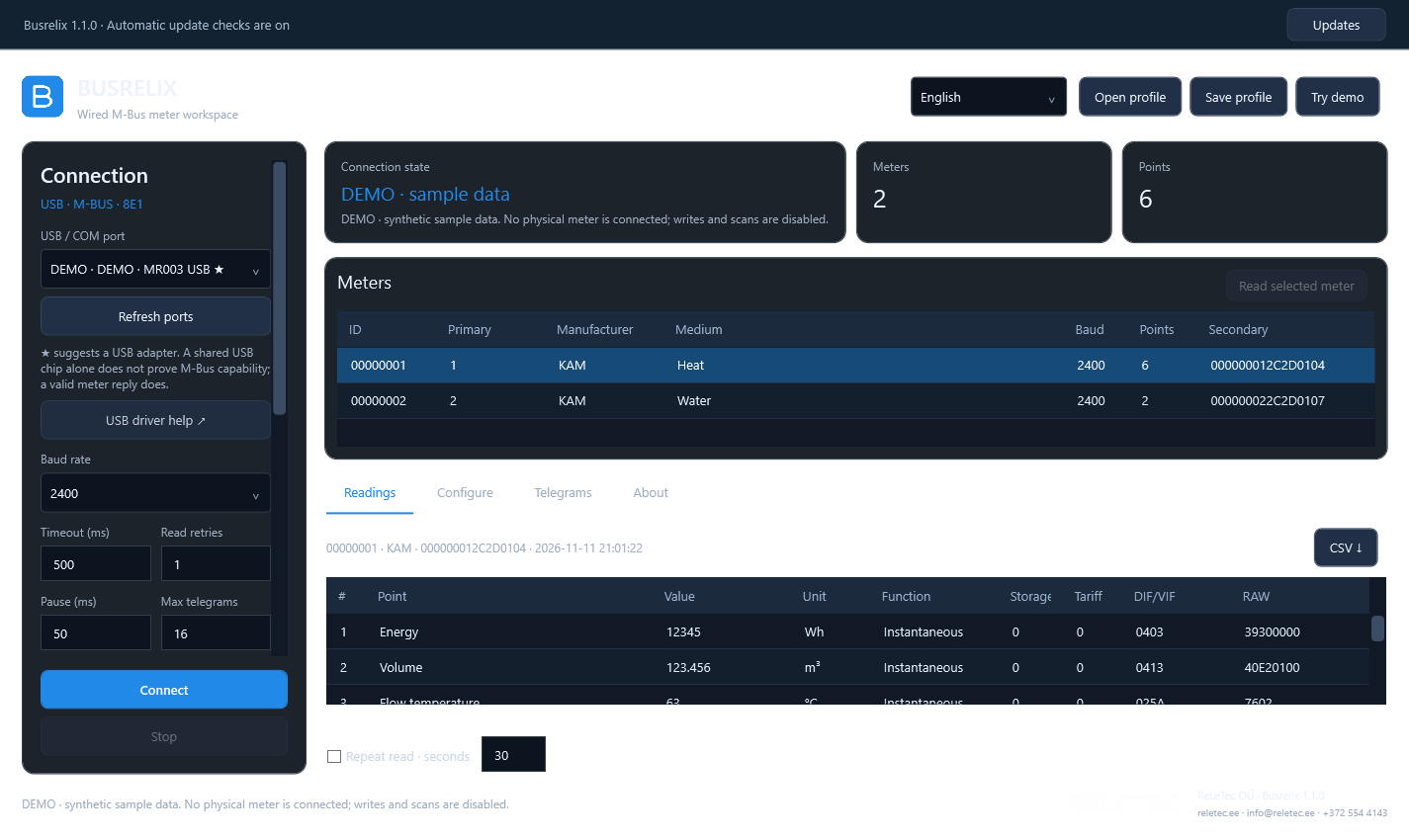
BUSRELIX
Scan primary addresses 0–250 or secondary ID masks. Select 300–9600 baud, retries and timeouts; stop a scan while keeping partial results.
View decoded values, units, storage and tariffs alongside DIF/VIF and raw bytes. Export CSV or save telegram captures for offline inspection.
Change supported primary addresses, secondary IDs and documented writable records. Each write checks meter identity and attempts a readback; acknowledgement alone is not confirmation.
Use the built-in demo without hardware. Switch between English, Estonian, Latvian, Lithuanian, Polish, Finnish, Norwegian and Swedish.
Connect a wired M-Bus master such as Relay MR003 USB and install its official driver if required.
Choose the COM port and baud rate, connect, then scan primary or secondary addresses.
Select a meter to read its records. Consult the manufacturer manual before any configuration change.
Wired M-Bus water, heat, cooling, gas and electricity meters, plus compatible pulse converters. The exact interface and writable functions depend on the model and its installed communication module.
Wireless M-Bus, RS485 and optical heads require different hardware. Encrypted, compact or unsupported manufacturer records remain visible as raw telegrams; not every record can be decoded or written.
BUSRELIX
Current Modrelix, Bacrelix, Netrelix and Busrelix releases are free to test and their existing MIT licence remains in force. Future releases may be paid and use different licence terms. No purchase or subscription is started now.
Windows 10/11 x64 · self-contained .NET runtime · no account required
Compatibility and instructions ↗Relay MR003 USB requires a compatible CP210x driver. The app reports detected driver problems. Drivers are not bundled or installed silently; use the official Relay / Silicon Labs driver.
165 automated protocol and simulator checks passed. Installation, Windows uninstall registration and complete removal were tested. A physical meter has not yet been tested.
A trusted Microsoft code signature is not yet available. Your browser or Windows SmartScreen may show a warning. Checksums help verify file integrity but do not replace a code signature.
1.1.0 · SHA-256 · MIT ↗Your feedback helps make the program and everyday work better. We always welcome ideas, suggestions and bug reports. Write in the language you prefer.
RELETEC / UPDATES
The application checks for new releases at startup and once a day while it is open. A notice and release notes appear when a newer version is available. Choose when to download and install; automatic checks can be switched off.
Free. No subscription.